Learn C# by Drawing – Turtle Graphics for Beginners with Woopec
Create graphics in C# using simple turtle commands – just like in Python.
✔ No complex setup
✔ Visual and interactive
✔ Perfect for beginners
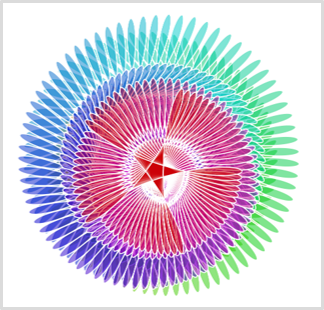
A few lines of code create rich, animated graphics
Write your first Turtle program in seconds
var turtle = Turtle.Seymour();
turtle.Forward(100);
turtle.Right(90);
turtle.Forward(100);
✔ Easy setup
✔ Learn programming visually
✔ Perfect for beginners
What is Turtle Graphics?
Turtle graphics is one of the easiest ways to learn programming.
Imagine a small turtle moving on the screen:
Forward(100)→ moves forward and draws a lineRight(90)→ turns right- combine commands → create shapes and patterns
This concept has been used for decades to teach programming – especially to beginners.
With Woopec, you can use this approach directly in C#.
Quick Start (5 minutes)
1. Install Woopec templates
Use Visual Studio Community Edition (it’s free) and install Woopec.Templates:
dotnet new --install Woopec.Templates
2. Create a project
Create a new project in Visual Studio and select the template “Woopec Turtle WPF Project”
3. Run your first program
using Woopec.Core;

internal class Program
{
    public static void TurtleMain()
    {
        var seymour = Turtle.Seymour();

        seymour.Left(45);
        seymour.Forward(100);
        seymour.Right(45);
        seymour.Forward(50);
   }
}
Run the program → the turtle starts drawing on the screen.
Examples
Simple drawing

Filled shapes
var woopec = new Turtle()
{
    FillColor = Colors.DarkBlue,
    PenColor = Colors.LightBlue
};

woopec.BeginFill();
do
{
    woopec.Forward(200);
    woopec.Right(170);
} while (woopec.Position.AbsoluteValue > 1);
woopec.EndFill();

More complex graphics
Why Woopec?
- Simple, Python-style API
- Works in modern C#
- Full IntelliSense documentation
- Multiple turtles and animations
- Path to more advanced graphics
Beyond Turtle Graphics
Turtle graphics is just the beginning.
With Woopec you can:
- create multiple moving objects
- synchronize movements
- build more complex visual programs
Learn More
- Why turtle graphics and C# are a great way to learn programming
- Getting Started with Woopec
- Comparison to other turtle libraries for C#
- Woopec Turtle Documentation
- Woopec Full Documentation
- Blog
Start Now
Try it yourself and write your first turtle program in C# 🐢🚀